



Mobile accessibility has become a core expectation in how people interact with technology. As more than 6 billion people worldwide own smartphones, accessibility features make these devices usable for individuals with varying abilities, from visual impairments to motor limitations, driving digital inclusion in daily life. In business, accessible apps can improve retention by up to 36%, while in healthcare and education, accessible mobile tools significantly expand engagement for users with disabilities. Continue reading to explore the latest statistics shaping the mobile accessibility landscape this year.
Editor’s Choice
- 91% of U.S. adults now own a smartphone, up from 35% in 2011, showing near‑ubiquitous adoption.
- Over half of all mobile phone users activate at least one accessibility setting.
- Android holds roughly 73% of the global OS market as of 2025.
- Nearly 50% of iOS users have at least one accessibility feature enabled.
- More than 1.3 billion people worldwide live with a disability impacting mobile use.
- Common assistive tech stats show 47% use screen readers and 25% use magnification tools.
- Accessibility best practices now align with legal standards like WCAG 2.1.
Recent Developments
- The European Accessibility Act now mandates accessible digital products, including mobile apps, for services like banking and eCommerce starting in 2025.
- Accessibility compliance is increasingly tied to WCAG 2.1 Level AA standards to remove major barriers.
- Tools for automated accessibility testing, including LLM‑powered checkers, are emerging to improve mobile app audits.
- Accessibility testing has expanded beyond simple checks to include manual evaluations with users with disabilities.
- Evolving accessibility norms now affect legal risk and brand reputation, with failure to comply opening companies to lawsuits.
- Inclusion‑oriented design is increasingly seen as a business advantage and compliance requirement.
- Developers now integrate accessibility checks earlier in development cycles to reduce long‑term fixes.
- Accessible mobile experiences are now tracked as part of quality metrics in many organizations.
Global Smartphone Penetration
- Over 6 billion people globally own a smartphone today.
- Smartphone ownership reaches 91% among U.S. adults.
- Android dominates with roughly 73% of global OS use.
- iOS accounts for much of the remaining mobile platform share globally.
- Ownership continues rising in emerging markets due to lower device costs and network expansion.
- New smartphone users often upgrade every 2–5 years, sustaining long‑term demand.
- Smartphone penetration correlates with Internet usage and mobile internet traffic share.
- In North America, smartphone use accounts for nearly half of all mobile data traffic now.
Accessibility Usage Rates
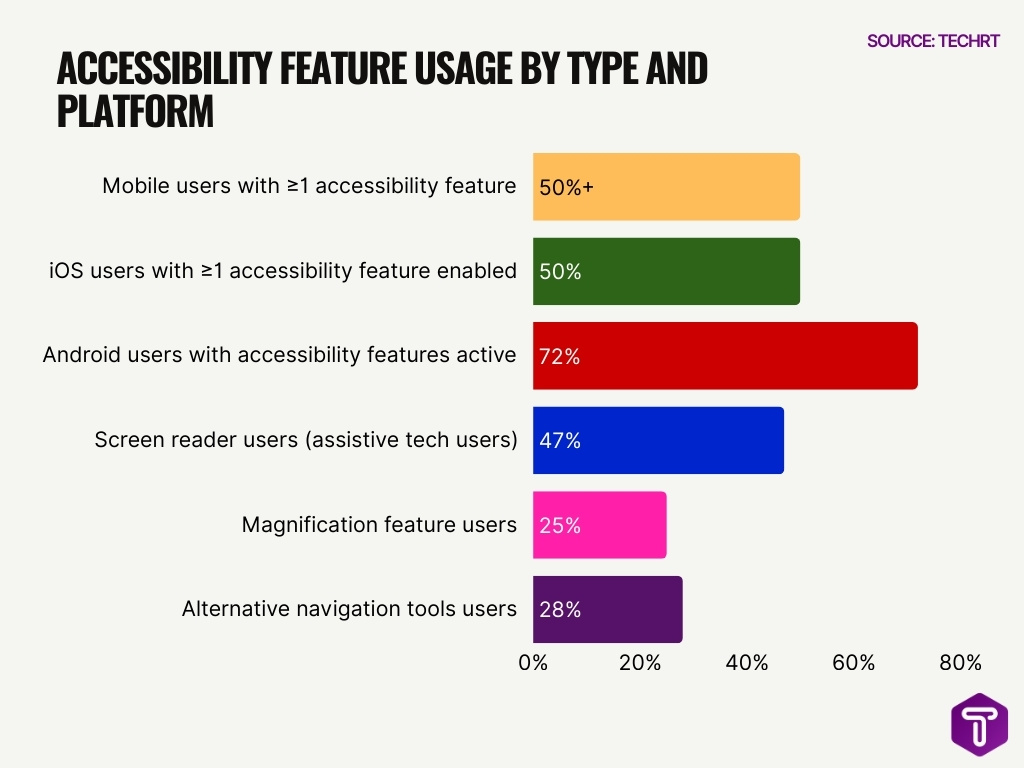
- Surveys find that more than half of all mobile users enable at least one accessibility feature.
- iOS users show about 50% activation of accessibility settings.
- Android users show around 72% activation for accessibility options.
- In surveyed samples, 47% use screen readers regularly.
- 25% use magnification features, indicating a need for visual accessibility tools.
- 28% use alternative navigation tools, showing demand beyond basic accessibility.
- Accessibility usage spans all ages and ability levels, including situational impairments.
- High accessibility usage correlates with improved engagement and retention on mobile apps.
iOS Accessibility Statistics
- Roughly half of iOS users have enabled accessibility features.
- iOS accessibility includes built‑in features like AssistiveTouch and VoiceOver.
- AssistiveTouch provides customizable on‑screen controls popular among users with motor needs.
- Apple’s VoiceOver remains the dominant mobile screen reader for visually impaired users.
- Many iOS accessibility tools are integrated without additional downloads.
- iOS updates frequently include new usability enhancements tied to accessibility.
- iPhone market share was around 29.1% globally in early 2025, meaning a sizable user base for accessibility tools.
- In the U.S., Apple’s iPhone holds a majority share of smartphone ownership.
Android Accessibility Statistics
- Android’s accessibility suite, including TalkBack, sees widespread pre‑installation across devices.
- Android continues to hold about 73% of the global mobile OS market.
- Android users show approximately 72% accessibility feature activation in surveys.
- Google’s Voice Access offers voice‑based control to broaden usability.
- Samsung and other OEMs include their own accessibility enhancements in addition to Android’s base.
- Android accessibility resources often combine native and third‑party tools.
- TalkBack alone has been installed billions of times via the Android Accessibility Suite.
- Accessibility documentation and support for Android continue to expand in 2026.
Mobile Accessibility Statistics
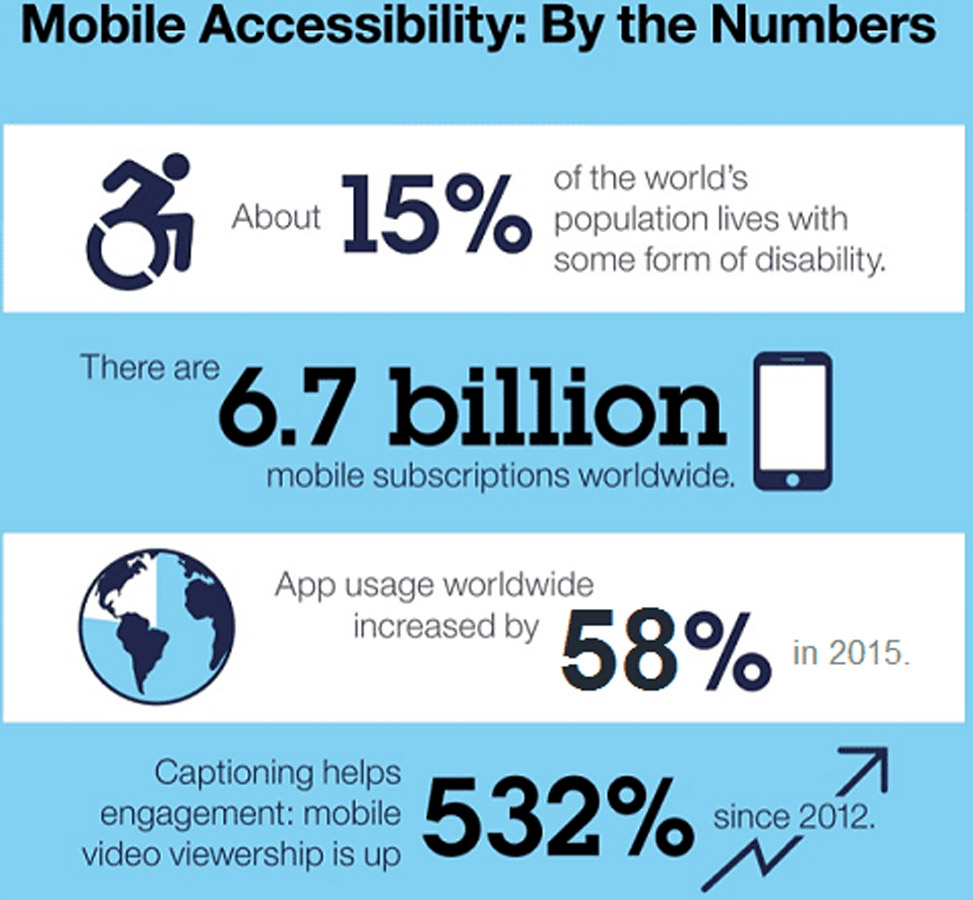
- 15% of the global population lives with some form of disability, making mobile accessibility a critical requirement rather than a niche feature.
- With 6.7 billion mobile subscriptions worldwide, accessible mobile experiences have the potential to reach nearly the entire connected global population.
- Global app usage rose by 58% in 2015, indicating a rapidly increasing dependence on mobile applications across demographics.
- Captioning dramatically improves engagement, as mobile video viewership increased by 532% since 2012, when accessibility features like captions were enabled.
Visual Impairment Features
- Over 295 million people worldwide suffer from moderate to severe visual impairment.
- 75.8% of screen reader users report blindness as their primary disability.
- VoiceOver commands 69% market share among mobile screen readers.
- TalkBack represents 29.5% of mobile screen reader usage.
- Android Accessibility Suite exceeds 10 billion downloads on Google Play.
- 91% of screen reader users depend on mobile devices daily.
- 90% of visually impaired users access the web and email via smartphones.
- Magnification and zoom tools top features for low vision users.
- The global screen reader market reached USD 1.3 billion in 2023.
Hearing Impairment Features
- Closed captioning and subtitles on mobile videos support users with hearing loss in consuming audio‑centric content.
- Live caption features auto‑generate captions for in‑device audio, aiding communication without sound.
- Customizable alert vibrations replace audio cues for incoming calls and notifications, improving phone usability for deaf users.
- Visual notification flashes help ensure critical alerts aren’t missed by users with hearing limitations.
- Transcription tools within messaging apps offer text alternatives where voice or audio would otherwise be required.
- Mobile communication platforms increasingly include sign language interpretation options within apps.
- Hearing aid compatibility settings help integrate Bluetooth‑enabled assistive devices with smartphones.
- Audio adjustments like mono audio support help users adapt sound output to personal preferences.
Speech and Voice Features
- The global voice assistant market reached $11.8 billion in 2024, projected to hit $84.51 billion by 2035 at a 19.6% CAGR.
- Over 8.4 billion voice-enabled devices are in use worldwide as of 2025.
- 52% of people use voice search daily or almost daily.
- 71% of consumers prefer voice search over typing when possible.
- Modern speech-to-text systems achieve over 90% accuracy in optimal conditions.
- One in three consumers with visual impairments uses voice assistants weekly.
- Voice Access on Android saw 500k downloads last month.
- 76% of U.S. drivers are likely to use voice generative AI in cars.
- The NLP market grew to USD 67.8 billion in 2025, driven by voice enhancements.
- Over 50% of global online searches now use voice assistants.
Dark Mode Activation
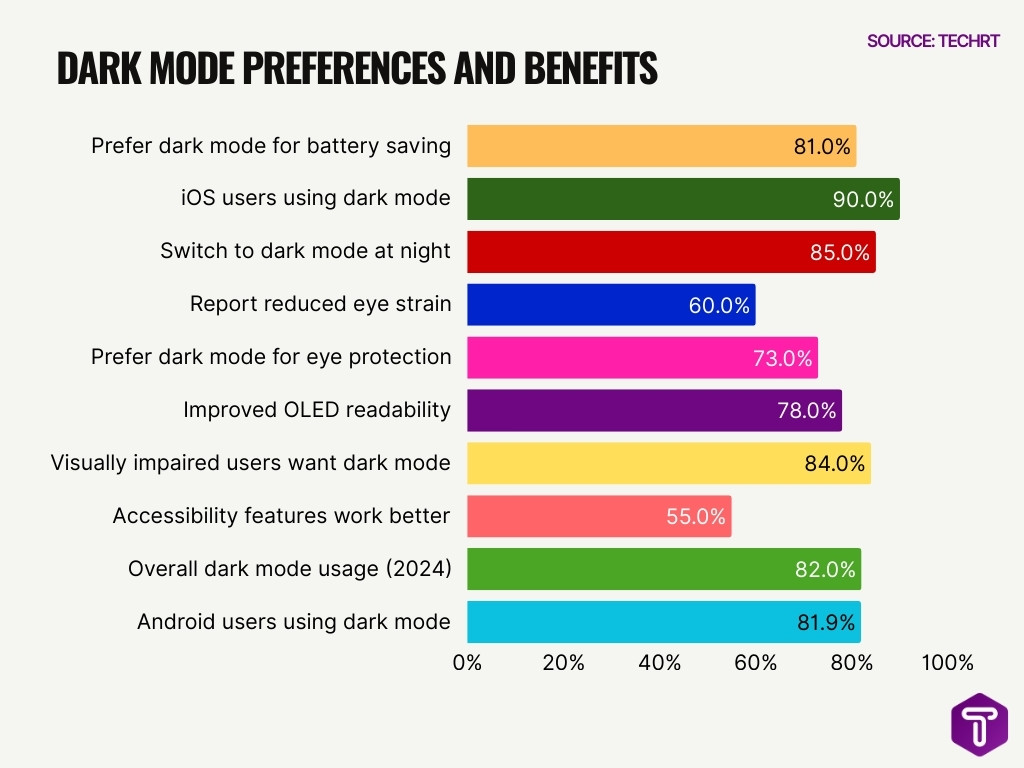
- 81% of global smartphone users prefer dark mode for battery saving.
- 90% of iOS users have enabled dark mode on their devices.
- 85% of users switch to dark mode during night hours.
- 60% of users report that dark mode reduces eye strain during prolonged use.
- 73% of users prefer dark mode to protect their eyes.
- 78% of users experience improved readability with dark mode on OLED screens.
- 84% of users with visual impairments request dark mode as a standard accessibility feature.
- 55% of visual impairment assistance features are more effective in dark mode.
- 82% of smartphone users use dark mode in 2024.
- 81.9% of Android users enable dark mode on phones and apps.
Motor Dexterity Features
- AssistiveTouch on iOS creates virtual controls for users who have trouble with gestures or precise taps.
- Customizable touch accommodations reduce gesture recognition errors and help users with limited hand mobility.
- Switch Control allows users to operate phones using external switches or adaptive devices.
- Gesture simplification options tailor how swipe and tap inputs are interpreted by the OS.
- Enlarged touch targets improve usability for individuals who struggle with small on‑screen elements.
- Haptic feedback often reinforces touch events, aiding users prone to accidental input.
- Voice‑based control lessens the need for manual interaction for users with severe dexterity restrictions.
- Keyboard adjustments and predictive text features help users with limited fine motor control type more efficiently.
Cognitive Disability Features
- Simplified UI modes reduce interface complexity for users with cognitive challenges.
- Text‑to‑speech and symbol cues support comprehension for individuals with learning impairments.
- Guided help and contextual prompts reduce user errors and improve task completion.
- Customizable reminders and timers aid organization and memory support.
- Predictive text and smart typing reduce cognitive load during messaging.
- Color‑coded feedback improves clarity of navigation steps and function outcomes.
- Voice-narrated walkthroughs assist when users encounter new or complex screens.
- Font clarity and layout consistency can mitigate cognitive processing challenges.
Screen Reader Adoption
- Over 91% of surveyed users who rely on assistive technology report using a screen reader on a mobile device.
- Among screen reader users, iOS devices account for about 70.6% of primary mobile usage.
- Android screen readers like TalkBack are used by roughly 34.7% of respondents with assistive needs.
- VoiceOver remains the dominant mobile screen reader within the iOS user base.
- Safari is the primary mobile browser for 58.2% of screen reader users, often paired with VoiceOver.
- Mobile preference for apps over websites among screen reader users stands at 58% for tasks like banking or shopping.
- A significant percentage of users combine braille output with screen readers (38%), enhancing accessibility for tactile learners.
- The shift toward mobile screen usage reflects a broader trend of smartphone preference over desktop assistive setups.
Voice Control Statistics
- Over 8.4 billion voice-enabled devices are in use worldwide in 2025.
- 91% of voice assistant users interact through smartphones.
- The voice assistant market reached $9,163 billion in 2025, growing at 26.45% CAGR.
- 52% of people use voice search daily or almost daily.
- Modern speech recognition achieves over 90% accuracy in optimal conditions.
- 153.5 million US users in 2025, a 2.5% year-over-year increase.
- 65% of 25–49-year-olds use voice devices daily.
- 46% of US adults with disabilities use voice assistants regularly.
- 59% increase in smart dictation usage across organizations.
- Voice commands on smartphones are used monthly by 61.5% of owners.
Demographic Insights
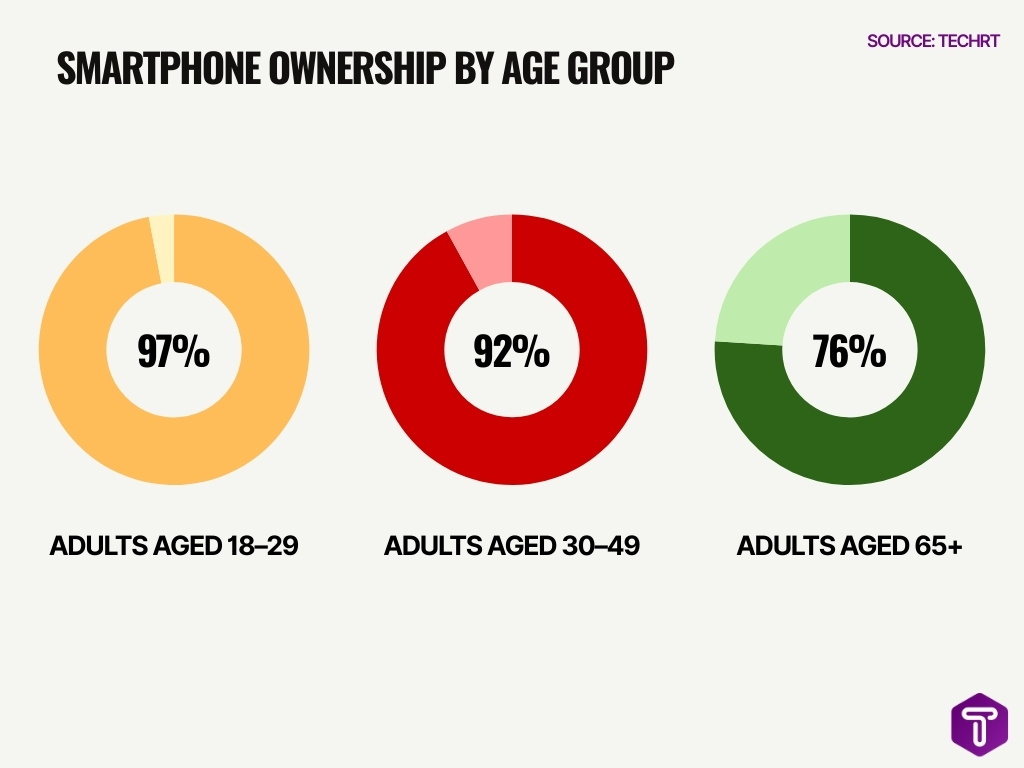
- In the U.S., 91% of adults owned a smartphone in 2025.
- Adults aged 18-29 show 97% smartphone ownership.
- 92% of Americans aged 30-49 own smartphones.
- Among adults 65+, 76% possess a smartphone.
- U.S. adults average 5 hours 16 minutes daily smartphone usage.
- 85% of U.S. adults check their smartphones within 10 minutes of waking.
- 14% of the U.S. population lives with a disability.
- 80% of people with visual impairments own a smartphone.
- 79% of users with disabilities primarily use mobile devices.
- 16% of U.S. adults are smartphone-only internet users.
Magnification and Zoom Usage
- Screen magnification and zoom tools are among the most commonly used accessibility adjustments on mobile devices because they help users with low vision see content more clearly.
- 25% of assistive technology users report regularly using magnification features to view text and images on smartphones.
- About 21% of mobile users cite the inability to pinch and zoom as a notable accessibility barrier when it is missing.
- Zoom usage isn’t limited to people with disabilities; many users rely on Zoom in bright sunlight or on crowded screens to read small text.
- Magnification features often pair with larger text settings, improving readability for a broad audience.
- Accessibility barriers related to zoom and magnification account for a significant portion of overall mobile usability issues (e.g., unreachable or blocked content).
- Developers increasingly test zoom behavior as part of mobile app QA to ensure interactive elements remain usable even when magnified.
- Proper implementation of Zoom features can reduce frustration and improve retention among users with visual, motor, and cognitive challenges.
Color Contrast Adjustments
- Approximately 8% of men and 0.5% of women worldwide have color vision deficiency.
- 79.1% of homepages feature low contrast text as the top accessibility issue.
- 4% of active devices use Windows High Contrast Mode, vital for low vision users.
- 51% of low vision users rely on high contrast modes for better readability.
- WCAG AA requires 4.5:1 contrast for normal text and 3:1 for large text.
- 2.2 billion people globally live with vision impairment, many aided by contrast adjustments.
- 30% of low vision survey respondents use high contrast settings regularly.
- Contrast settings at 60–70% reduce eye strain for most digital users.
- Tools like Android Accessibility Scanner integrate contrast checks in mobile workflows.
Font Size Changes
- Adjustable font size settings help users personalize text to meet their reading needs.
- Many apps now support dynamic type or system font size integration to automatically resize text based on user preferences.
- Larger fonts are especially beneficial for users with low vision or reading fatigue, improving comprehension and reducing eye strain.
- When mobile apps fail to respect system font settings, it creates barriers for users who rely on larger text.
- Around 22% of users cited the inability to resize text as a common barrier in mobile environments.
- Dynamic font support is linked with higher accessibility satisfaction in user experience surveys.
- Implementing scalable font sizes can reduce cognitive load for users with reading or processing challenges.
- Apps that offer text controls alongside layout adjustments see greater overall engagement among users with accessibility needs.
Mobile Accessibility Barriers: Key User Challenges
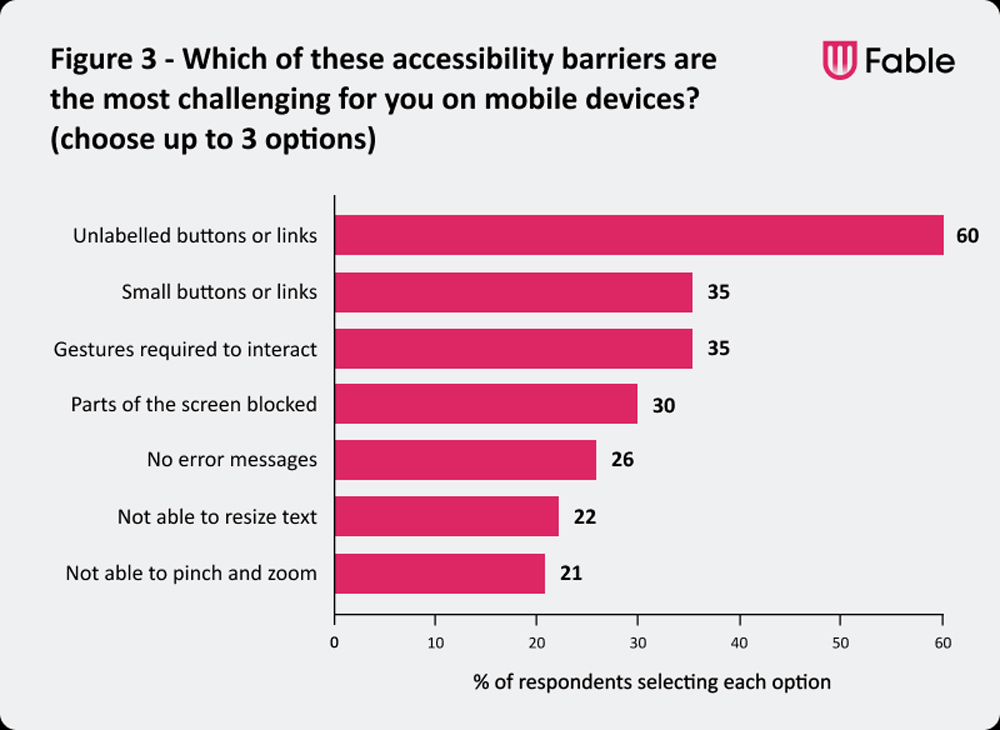
- Unlabelled buttons or links are the most critical barrier, affecting 60% of mobile users, making navigation difficult for screen reader and assistive technology users.
- Small buttons or links create usability issues for 35% of respondents, highlighting persistent problems with touch target sizing on mobile interfaces.
- Gesture-dependent interactions are challenging for 35% of users, indicating that many apps still rely on non-accessible swipe or multi-finger gestures.
- Blocked or obscured screen content impacts 30% of users, often caused by overlays, pop-ups, or poor responsive design.
- Missing or unclear error messages affect 26% of respondents, increasing task failure and user frustration, especially for users with cognitive or visual impairments.
- Inability to resize text is a barrier for 22% of users, showing limited support for scalable typography and system font settings.
- Lack of pinch-to-zoom functionality affects 21% of respondents, reducing accessibility for users with low vision who rely on magnification.
Haptic Feedback Stats
- Haptic feedback uses tactile responses to signal events, aiding users who may not rely on visual or audio cues.
- Vibration cues can notify users about errors, confirmations, or navigation events without requiring sight or hearing.
- Haptics improve usability for users with motor or sensory impairments, reinforcing interaction confidence.
- Developers often use haptic feedback to highlight interactive elements like buttons and form fields.
- Some platforms allow customizable haptic intensity, so users can tailor feedback to their preferences.
- Enhanced haptics accompany screen reader cues to help users orient themselves in UI layouts.
- Haptic feedback has become a standard part of accessible mobile design, especially for gaming and productivity apps.
- Research suggests that tactile signals can reduce input errors among users with limited vision.
Platform Comparisons
- iOS accessibility features see 50% adoption among surveyed users, compared to 72% on Android.
- VoiceOver holds 60.5% of mobile screen reader usage, far ahead of TalkBack at 21.6%.
- The global smartphone market favors Android at 72%, while iOS captures 27% share.
- 65% of free iOS apps meet accessibility standards, versus 75% for Android apps.
- Half of Dutch iOS users activate at least one accessibility setting system-wide.
- Android‘s device variety leads to varying accessibility, but offers deeper customization options.
- iOS leads in consistent out-of-the-box support due to uniform hardware standards.
- Cross-platform apps respecting system settings boost engagement by up to 30% for disabled users.
- Annual OS updates align accessibility progress, with both platforms supporting core functions.
Frequently Asked Questions (FAQs)
What percentage of mobile assistive tech users rely on screen readers?
About 47% of respondents use screen readers on mobile devices.
What share of mobile users use screen magnification tools?
Approximately 25% of mobile users report regular use of magnification features.
What proportion of mobile users use alternative navigation aids?
Around 28% of users utilize alternative navigation features such as switch control or voice navigation.
How many times has the Android Accessibility Suite been installed globally?
The Android Accessibility Suite, including TalkBack, has been downloaded over 10 billion times.
By how much has voice control usage grown since 2023, according to emerging tech stats?
Voice control usage has increased by 125% compared to 2023.
Conclusion
Mobile accessibility features are no longer optional add‑ons; they’re essential components of modern smartphone experiences. Users across age groups and ability levels rely on tools like magnification, high contrast modes, dark themes, and haptic cues to interact confidently and comfortably with their devices. Adoption patterns vary by platform and user context, but demand for inclusive design continues to rise as smartphone ownership and usage rise sharply in the U.S. and globally.
As accessibility becomes increasingly integrated into everyday mobile interactions, developers and businesses that prioritize inclusive design not only improve usability but also reach wider audiences and better serve diverse user needs.

Leave a comment
Have something to say about this article? Add your comment and start the discussion.