



Bloatware, unwanted preinstalled software on computers and mobile devices, continues to affect how users experience technology. It can slow systems, drain batteries, and even introduce security concerns, making it more than just an annoyance. For enterprises deploying hundreds of Windows machines or for consumers unboxing new Android phones, bloatware impacts productivity and device longevity. In the healthcare and education sectors, unnecessary apps can complicate compliance and data privacy. This article dives into the latest bloatware removal statistics, prevalence trends, and insights shaping how devices perform today.
Editor’s Choice
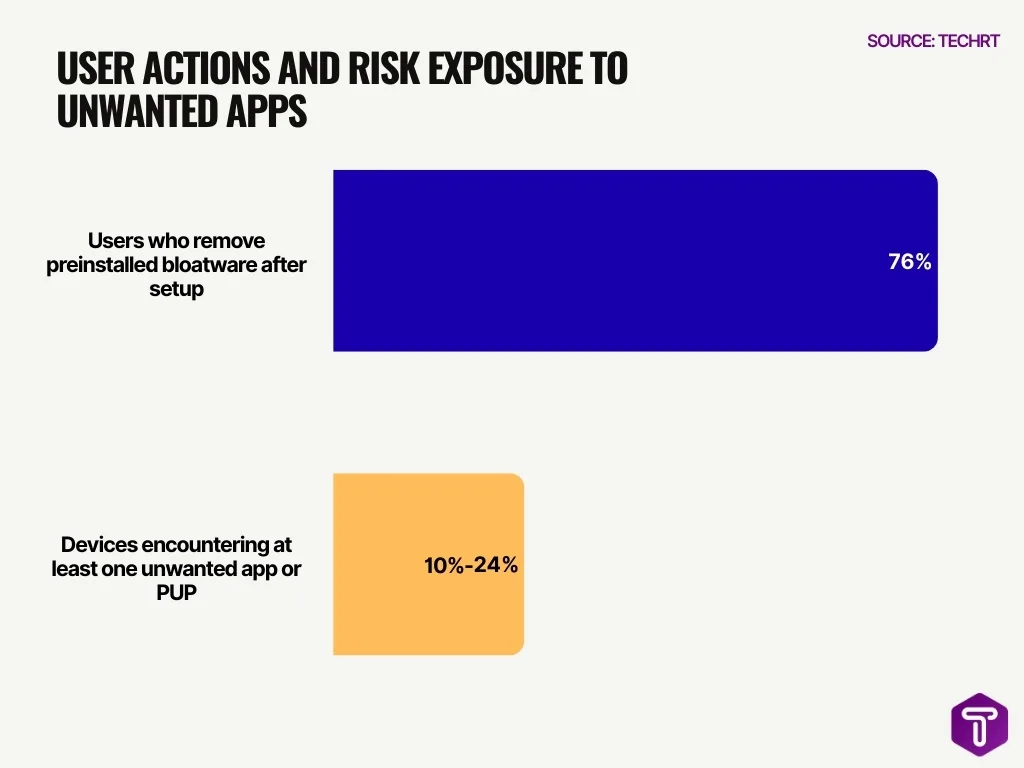
- 76% of users remove bloatware immediately after buying a new device, showing widespread dissatisfaction.
- The average smartphone holds 80+ installed apps, many of which are unused or preloaded.
- Android holds 72% share of the global mobile market, exposing more users to preinstalled app issues.
- Between 10% and 24% of devices encounter at least one unwanted app or PUP through various vectors.
- Only about 25% of mobile users run antivirus software in 2025, potentially leaving bloatware and unwanted apps unchecked.
- Bloatware contributes to significant battery use and storage impact, according to empirical research.
- Windows PCs frequently ship with multiple preinstalled apps from OEMs that many users consider bloatware.
Recent Developments
- 2025–2026 trend data shows a significant increase in demand for cleaner software bundles from manufacturers.
- In regulatory landscapes, privacy advocates are calling for clearer labeling of preinstalled software.
- Security analysis firms highlight that preinstalled apps on Android can harbor vulnerabilities, intensifying scrutiny on OEM practices.
- Growth of system cleanup and optimization tools targeting bloatware remediation has accelerated.
- OEMs like Google have explored universal uninstall options for preloaded apps in future Android versions.
- Tech supply chains are evolving to include minimal-build device options with less bundled software.
- User education campaigns increased, with more resources on how to disable or remove unwanted apps.
- Demand for enterprise debloat solutions, for IT teams, is driving commercial software development.
What Is Bloatware?
- Bloatware refers to preinstalled, often unwanted software that comes with a new device.
- It can include trial versions, ad-driven apps, or manufacturer-specific utilities.
- Bloatware often occupies storage without delivering lasting value to users.
- On PCs, it may appear as third-party trialware or OEM utilities.
- Some bloatware runs in the background, consuming CPU and RAM.
- Mobile bloatware sometimes tracks usage or pushes ads.
- Devices that come with preloaded software may feel cluttered to users upon first use.
- Bloatware is also called “crapware” or PUP, Potentially Unwanted Programs, in cybersecurity contexts.
Common Types of Bloatware
- Trialware: Limited-time software that stays after trial expiration.
- Utility apps: OEM tools that many users never open.
- Toolbars and browser add-ons: Historically common on Windows browsers.
- Adware-like apps: Deliver ads outside of mainstream app stores.
- Carrier-branded applications: Often on subsidized phones.
- System preloaded games: Installed by manufacturers without user choice.
- News, weather, or fitness widgets: May run background services.
- Manufacturer services: Some are truly useful, while others mirror OS-provided features.
Prevalence of Bloatware on Devices
- A 2025 survey reported 76% of users remove preinstalled bloatware right after setup.
- Many smartphones arrive with 50–100 preinstalled apps, including carrier and OEM software.
- Between 10% and 24% of devices encounter at least one unwanted app or PUP.
- Android’s openness contributes to higher preinstallation rates than iOS.
- Preinstalled apps make up a meaningful portion of installed apps on new devices.
- OEM and carrier deals still fuel preloaded software growth in certain regions.
- Users often uninstall only a subset of bloatware, leaving some hidden background apps.
- Devices meant for business use may see corporate image deployment remove bloatware before shipment.
Bloatware on Windows Devices
- 90%+ of new Windows PCs sold in the US ship with third-party or OEM preinstalled apps beyond core Microsoft software.
- A 2025 Windows user survey found that 1 in 3 users uninstalled at least five apps within the first week of purchase.
- OEM trialware, including antivirus and backup tools, accounts for up to 1.5 GB of storage on mid-range laptops.
- Clean Windows installations can reduce boot times by 18% to 28% compared with factory images.
- 62% of IT administrators report using debloating scripts during enterprise device provisioning.
- Windows Store–based apps reappear after feature updates in nearly 40% of consumer systems.
- Microsoft allows the removal of some bundled apps, but system-linked packages remain locked on most OEM builds.
- In 2026, Windows 11 devices still preload an average of 20–30 nonessential apps, depending on the manufacturer.
Bloatware on iOS and macOS
- Apple devices include fewer third-party apps, but iOS ships with 30+ first-party apps by default.
- Since iOS 16, users can remove or offload over 70% of built-in apps, reducing perceived bloat.
- macOS installs an average of 12–15 default applications beyond core system utilities.
- Less than 10% of macOS users identify built-in Apple apps as true bloatware.
- Enterprise Mac deployments often remove Spotlight add-ons and background services to improve performance.
- Apple’s sandboxing limits background activity, keeping idle CPU usage below 3% for most default apps.
- Third-party bloatware on macOS typically arrives through bundled installers, not factory images.
- iOS app offloading can recover up to 1.2 GB of space on average user devices.
Bloatware on Android Devices
- Android devices ship with an average of 38 to 52 preinstalled apps, many of which users never open.
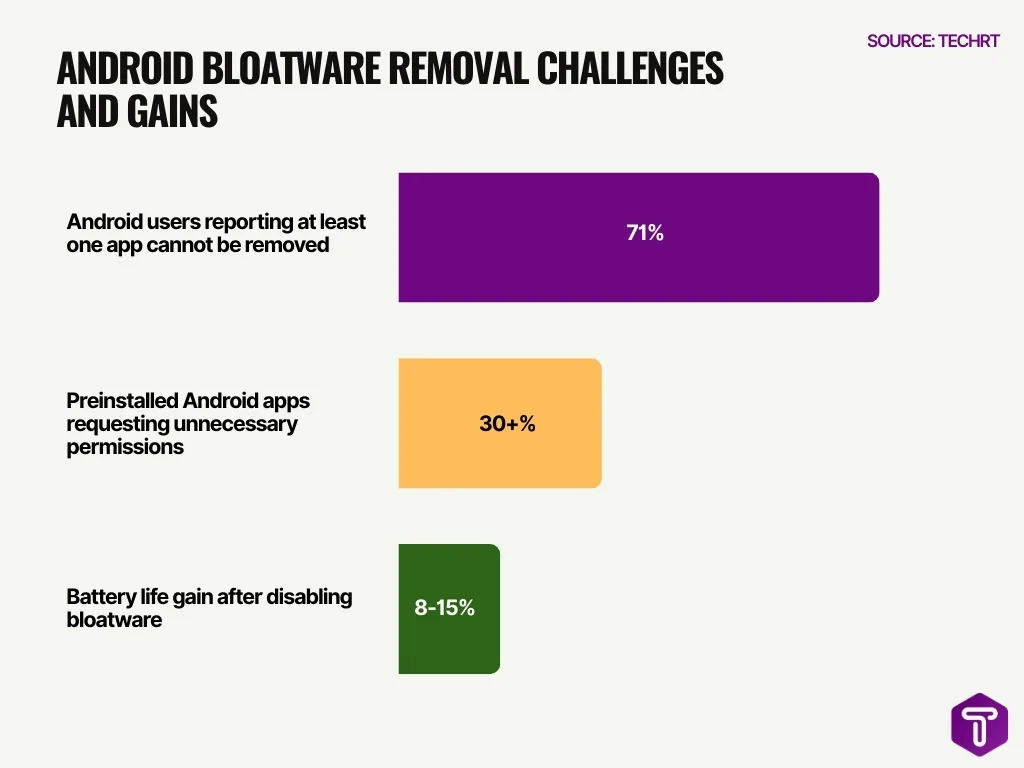
- 71% of Android users report that at least one preinstalled app cannot be fully removed without advanced steps.
- Carrier-branded Android phones include 20% more bloatware apps than unlocked models.
- A 2025 study found that over 30% of preinstalled Android apps request permissions unnecessary for core functionality.
- System apps on Android consume up to 12% of available RAM on budget devices.
- Users who disable bloatware report battery life gains of 8% to 15% within the first month.
- Android OEM skins contribute heavily, with some brands adding double-digit duplicate apps for messaging, galleries, and browsers.
- In emerging markets, bloatware-supported ad revenue offsets hardware costs, increasing preload rates.
Performance Impact Statistics
- Devices with heavy bloatware show up to 35% slower app launch times.
- Background bloatware processes increase average CPU usage by 8% to 12%.
- Windows systems with OEM bloatware experience longer shutdown times by 20 seconds on average.
- Android phones with excessive preinstalled apps score lower benchmark results by 10%.
- Removing bloatware improves overall system responsiveness for 67% of users.
- Entry-level devices feel performance impact more sharply due to limited RAM.
- Enterprise environments report fewer help-desk tickets after standard debloating.
- Performance gains are most visible within the first 30 days after cleanup.
Security Risks Statistics
- 23% of Android security vulnerabilities in recent years were linked to preinstalled apps.
- A 2025 audit uncovered 146 vulnerabilities across OEM Android bloatware packages.
- Preinstalled apps often lag behind Play Store updates, increasing exposure windows.
- 1 in 4 users cannot update or patch certain system apps manually.
- Bloatware has been linked to data overcollection, including location and usage metrics.
- Enterprise systems with unmanaged bloatware face higher compliance risks.
- Windows trialware has historically introduced attack surfaces via outdated drivers.
- Security teams recommend minimizing preinstalled software as a baseline defense strategy.
Storage Usage Statistics
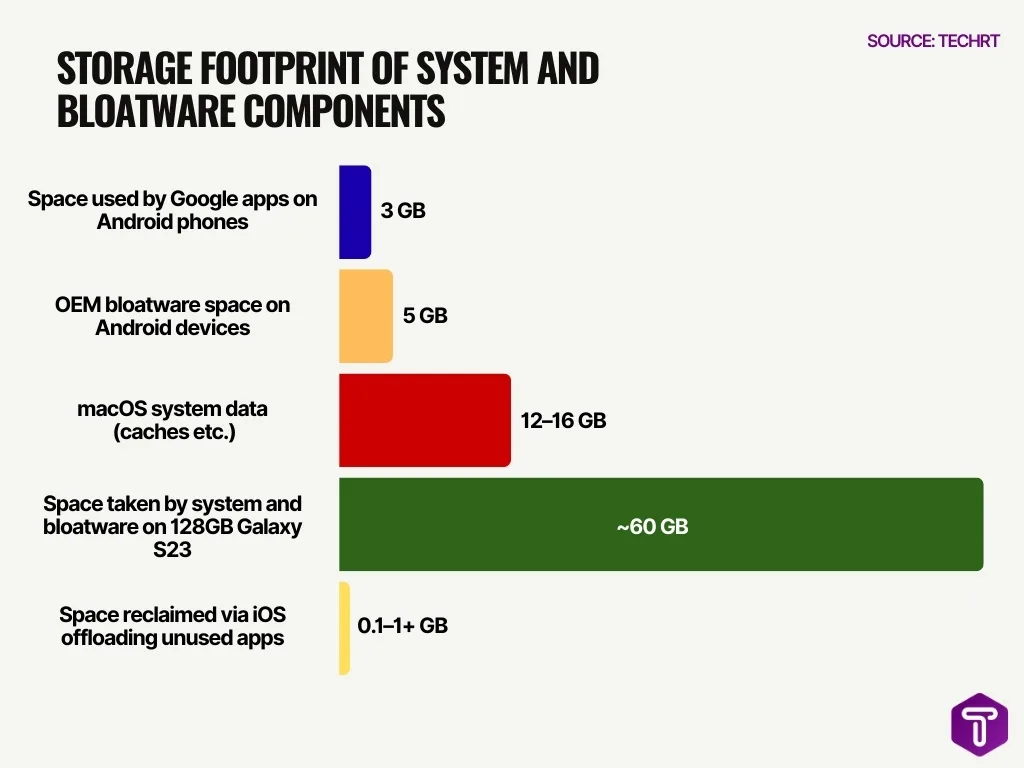
- Google apps alone consume up to 3GB on Android phones.
- OEM bloatware adds another 5GB on average Android devices.
- On a 64GB Android phone, system files and bloatware eat 25-30% of storage.
- Individual bloatware apps frequently exceed 200MB each.
- 92% of pre-installed apps remain unused after the first month.
- Sony phones force 6GB of unwanted preinstalled software.
- macOS system data, like caches, averages 12-16GB total.
- iOS offloading unused apps reclaims hundreds of MB to 1GB+.
- On a 128GB Samsung Galaxy S23, system and bloatware take nearly 60GB.
How to Identify Bloatware
- Look for apps that come preinstalled and cannot be removed through standard settings menus.
- On Windows, review the installed programs list via Settings → Apps to flag unused or unfamiliar entries.
- Monitor background processes, apps consuming CPU or battery with no active use are often bloatware.
- Check app permissions; bloatware often requests unnecessary access.
- On Android, use the Apps section under Settings to identify non-core apps.
- iOS Storage screens list apps by space usage.
- Use dedicated bloatware analysis tools to scan and flag potentially unwanted programs.
- Track apps that launch at startup but rarely see user interaction.
Manual Removal Methods
- On Windows, open Settings → Apps and uninstall unneeded apps directly.
- On Android, open Settings → Apps, select the app, and tap Uninstall or Disable.
- iOS users can press and hold app icons to delete or offload unused apps.
- macOS users drag apps to the Trash and empty it.
- Windows Disk Cleanup can remove temporary files and cached setup files.
- Periodic auditing of installed programs reveals seldom-used apps.
- Keep a checklist of core apps and remove anything outside that list.
- Manual removal helps users retain control over what stays on their device.
PowerShell Debloat Scripts
- Win11Debloat script garnered 37.2k stars and 1.4k forks on GitHub.
- Windows 11 comes with over 100 preinstalled apps targeted by debloat scripts.
- IT admins report bloatware causes up to 20-30% higher support tickets.
- PowerShell handles Get-AppxPackage for 144+ bloatware packages in popular routines.
- 37.2k users starred the top debloat tool, indicating widespread IT pro adoption.
- Bloatware consumes 5-15% extra disk space and RAM on fresh Windows installs.
- Custom allow-lists in scripts preserve 20-30 essential apps like Calculator and Photos.
- Microsoft now offers an official policy to remove 8+ preinstalled apps via Group Policy.
- Debloat scripts improve boot times by 10-20% by disabling telemetry services.
- Remote deployment via Intune reaches thousands of endpoints for persistent bloatware control.
Battery Drain Statistics
- Background bloatware consumes up to 14% of daily battery capacity on smartphones.
- Users disabling preinstalled apps see battery life improvements averaging 10%.
- On Android, bloatware accounts for 1 in 5 background wake events.
- Windows laptops with OEM utilities show 104% faster boot times than those with bloatware.
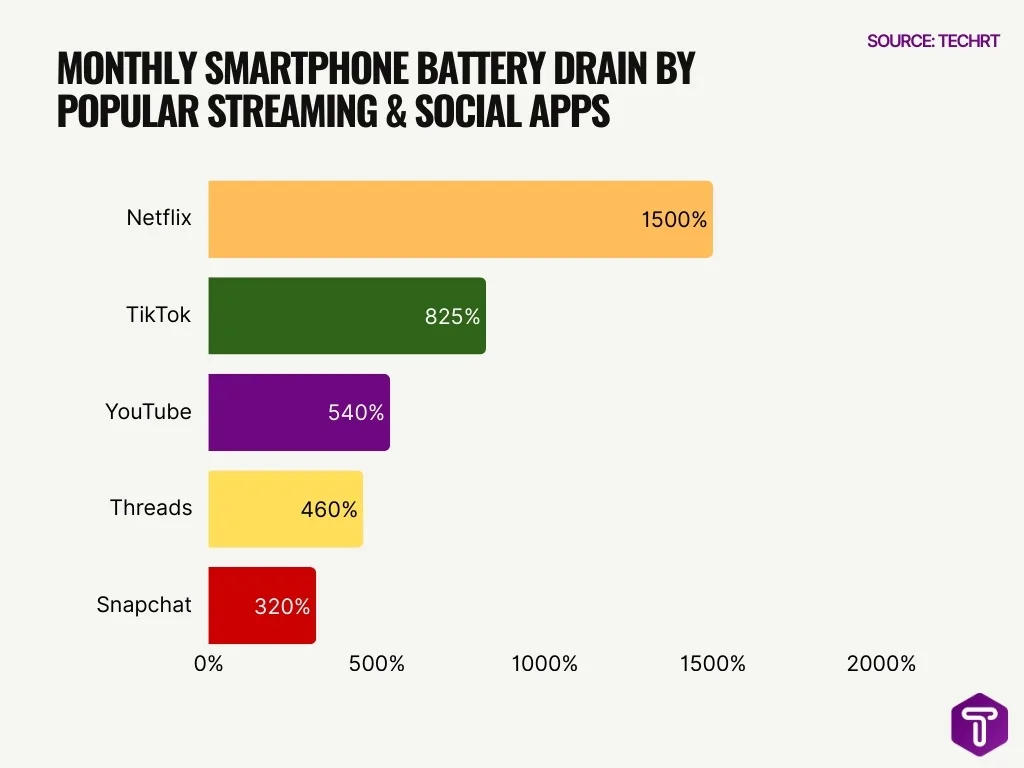
- Streaming apps like Netflix drain 1,500% of a full battery charge monthly via background processes.
- TikTok consumes 825% of battery per month from 33 hours of usage, plus 10 hours of background activity.
- YouTube drains 20% battery per hour of viewing and 540% monthly overall.
- Battery optimization improves after bloatware removal, with clean installs lasting 28 minutes longer.
- The Threads app uses 460% of the battery monthly, including 6.9 hours of background runtime.
- Snapchat accounts for 320% battery drain monthly, half from background activity.
Advanced Removal Tools
- Tools like AVG TuneUp identify and remove background bloatware automatically.
- Bloatware removal tools combine scanning with uninstall suggestions.
- Avast Cleanup removes junk and patches security risks.
- Dedicated cleaners scan for installers, caches, and temp data.
- Some utilities help reclaim tens of gigabytes of storage.
- Tools often include maintenance features to prevent future bloat.
- Many support cross-platform cleanup for Windows, Android, macOS, and iOS.
- Advanced tools can flag potentially unsafe bloatware.
Preventing Bloatware Reinstallation
- Custom installs prevent up to 40% of bloatware preinstallation on new devices.
- 10-24% of user devices encounter at least one unwanted bloatware app annually.
- Devices free of bloatware boot 40% faster and gain 28 extra minutes of battery life.
- 87% of app installs from official stores like Play reduce bloatware risks compared to alternatives.
- Freeware bundles analyzed in 446,000 offers commonly include unwanted ad injectors and PUPs.
- Security tools detect and block PUAs like bloatware in up to 80% of known cases.
- Bloatware removal scripts succeed in enterprise setups but require updates for 100% consistency.
- 6% of unwanted apps stem from bloatware pushed post-OS updates on devices.
- IT pros waste 7 hours weekly managing bloatware, costing businesses $84B yearly in the US.
- User education boosts awareness, enabling resistance to deceptive bloatware installs.
Benefits of Bloatware Removal
- Removing bloatware frees up to several GB of storage space on average devices.
- Users report 20-40% improvement in system responsiveness after removal.
- Debloating shrinks the attack surface by removing up to 60% of known CVEs.
- 89% of IT pros waste time weekly due to bloated software frustration.
- Bloatware-free PCs start up 104% faster and shut down 35% quicker.
- Devices without bloatware gain 28 extra minutes of battery life.
- 82% of IT workers experience burnout partly from bloated apps.
- Debloating reduces program complexity by an average 50.3%.
- 76% of users cite bloatware as slowing down devices and draining resources.
- Advanced debloating cuts vulnerabilities introduced by 79.1%.
Frequently Asked Questions (FAQs)
What percentage of users uninstall preinstalled bloatware immediately after setting up their device?
What share of Android holds in the global operating system market where bloatware issues are most common?
What proportion of installed mobile apps are uninstalled within the first 30 days of installation?
What percentage of installed apps on a typical smartphone go unused each month?
What percentage of unwanted app installations are attributed to bloatware as a distribution vector?
Conclusion
Bloatware remains a persistent challenge, consuming storage, slowing performance, and complicating device security across Windows, Android, iOS, and macOS platforms. From basic identification methods to advanced PowerShell scripts and dedicated cleanup tools, users and IT professionals have an array of strategies to strip out unwanted software and reclaim valuable resources. Proactive prevention during installations and periodic audits helps ensure devices stay lean and efficient.
As consumer expectations and regulatory pressure grow, the focus on cleaner, user-centric software ecosystems will only intensify. Understanding the data and methods behind bloatware removal empowers better device ownership and ongoing performance gains.

Leave a comment
Have something to say about this article? Add your comment and start the discussion.