




Finding your friends on Spotify shouldn’t be a challenge, yet the app’s social features are often hidden behind menus. Whether you want to see what your friends are listening to or share a collaborative playlist, connecting with others is the best way to discover new music. In this guide, we’ll show you exactly how to find people on Spotify using their name, username, or Facebook account. We’ve tested these methods on the latest 2026 Spotify updates for iOS, Android, and Desktop to ensure you get the most accurate steps.
How to Add Friends on Spotify?
Before we get into how to find people on Spotify, let’s discuss how to add friends. You can search for and add friends on Spotify in a few different ways.
Using Facebook
The first way is by using your Facebook account. If you connect your Spotify account to Facebook, you will be able to see which of your Facebook friends also have a Spotify account. You can then add them as a friend on Spotify by clicking on the “Add Friend” button next to their name.
Adding Friends Manually
The second way is by adding friends manually. To do this, you will need to know their Spotify username. You can find someone’s Spotify username by looking at their profile page or by searching for them on Spotify. Once you have their username, you can add them as a friend by going to your friend list and clicking on the “Add Friend” button.
How to Find People on Spotify Using Facebook?
If you have logged in with your Facebook account on Spotify, it becomes easy to find your friends there, given that your friends have also logged in with Facebook on their Spotify application.
The process to find friends on Spotify using Facebook is different on different devices. Let us discuss all of them.
Spotify User Search on Desktop App through Facebook
Here are the steps to add friends on Spotify through Facebook on PC:
- Open the Spotify app on your Windows PC and click on the Add friend icon next to Friend Activity on the top-right corner.

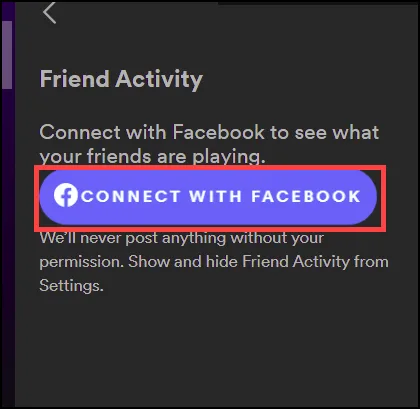
- Next, click on the CONNECT WITH FACEBOOK button to add your Facebook friend.
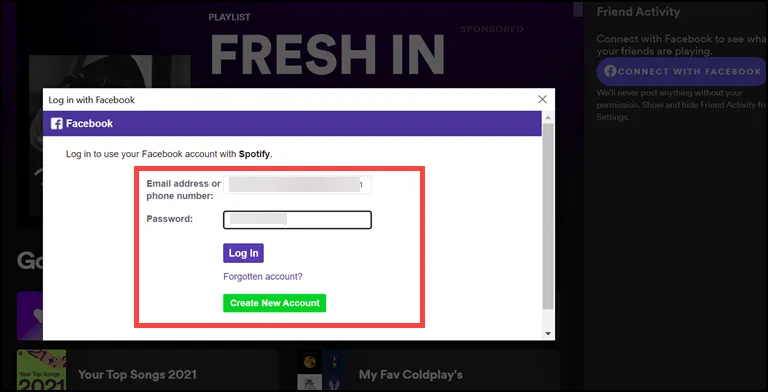
- Enter your Facebook credentials in the log-in window.
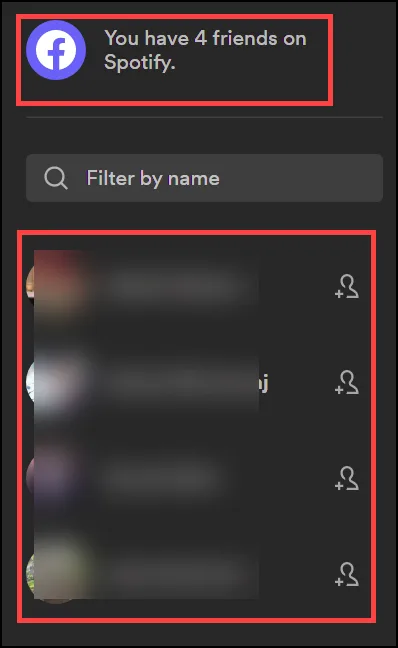
- After logging in, you will see the list of your Facebook friends who are also on Spotify.
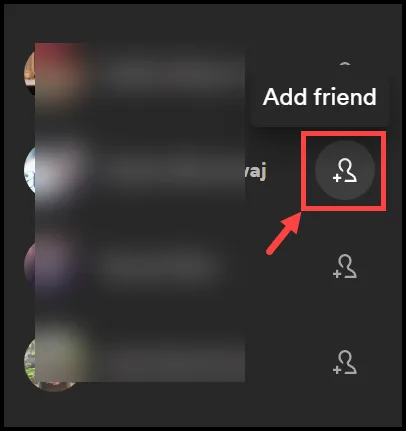
- Click on add friend icon next to their name to add them to your Spotify friend list.
Spotify User Search on Android/iOS App through Facebook
If you are using Spotify on your Android or iOS device, here are the steps to add friends on Spotify through Facebook ID:
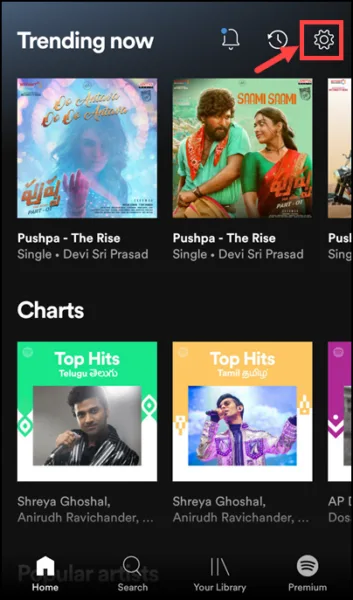
- Launch the Spotify on your Android device and tap on the Settings icon at the top right.
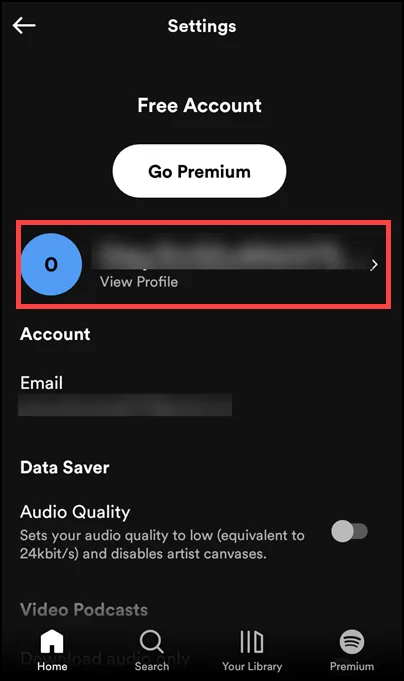
- Next, tap on the View Profile button to reach the profile settings.
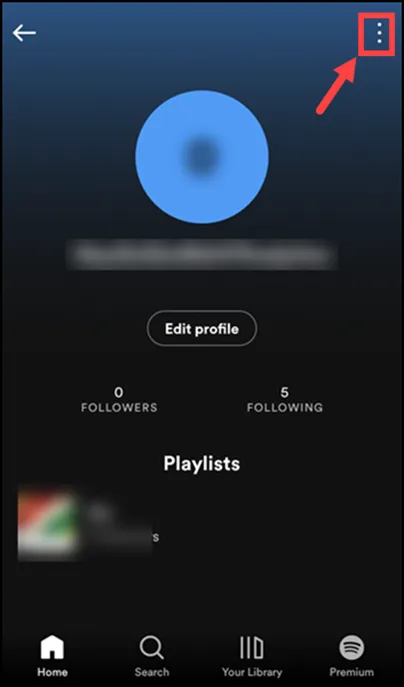
- Under the profile settings, tap on the three dots at the top-right.
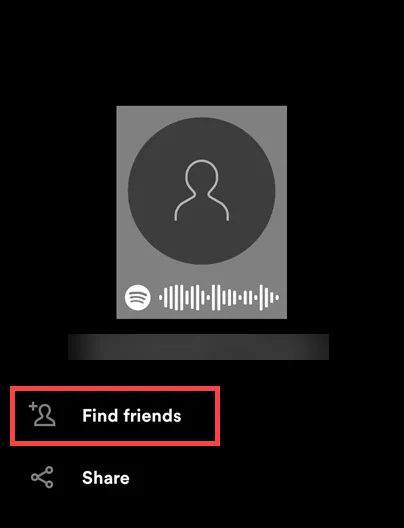
- Tap on the Find friends button to search for friends.
- Now, under Find Friends settings, push the Connect Facebook button.
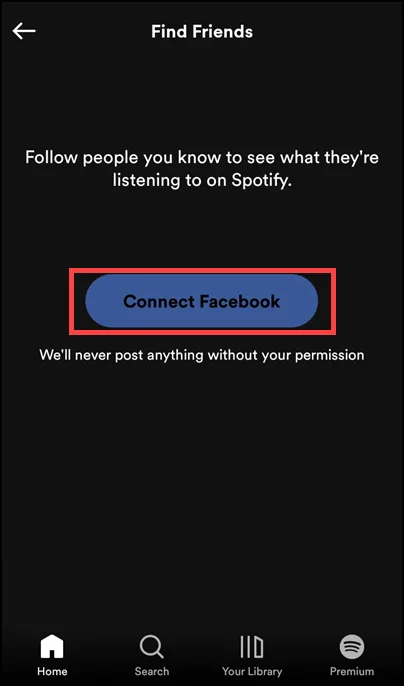
- You will be redirected to the Facebook login page. Enter your credentials to log in.
- After logging in with Facebook, you will see the list of your Facebook friends who are also on Spotify.
- Click on add friend icon next to their name to add them to your Spotify friend list,
How to Find Someone on Spotify using their Username?
If you want to find and add someone on Spotify who is not connected with you on Facebook or who has not joined their Facebook account with Spotify, you can do that by knowing their username and searching it on the Spotify app.
Find Spotify Username
Before finding your friends on Spotify, ask them to follow these steps to know their username and share it with you. These steps are for the Windows app:
- Launch the Spotify app or open Spotify on the web on your Windows OS.
- Click on your name to expand the menu and select Account.

- If you are on the app, you will be redirected to your Spotify Account Overview page.
- Under the Account overview, check for the username.
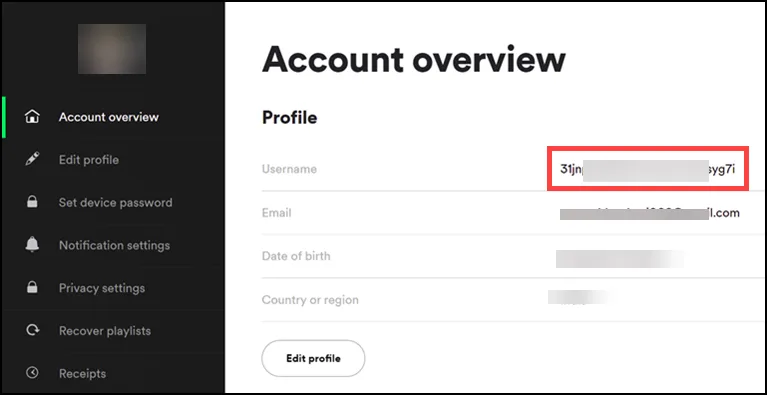
- Copy the username for sharing.
Since only the account holder can see the username, ask your friend to share their username with you by following the above steps.
Find Friends On Spotify Using Username on Desktop App
After knowing the username, follow these steps to find friends on Spotify:
- Launch Spotify application on your Windows OS.
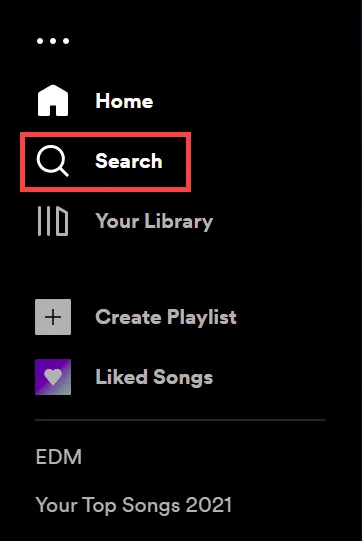
- Switch to the Search tab on the left pane to type username.
- On the Spotify search bar, type spotify:user:username. Replace username with your friend’s username.
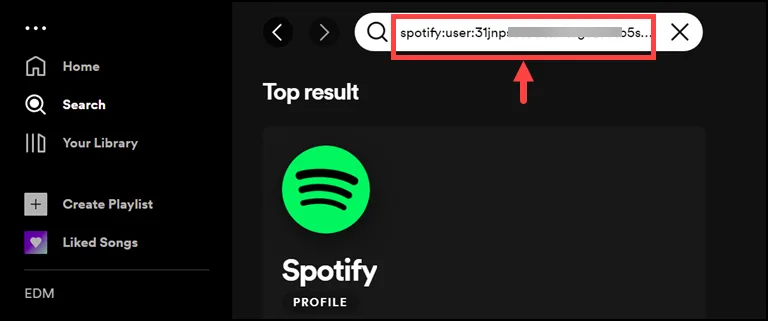
- After finding out your friend’s profile, open it and follow.
Find Friends On Spotify Using Username on Android/iOS App
If you know the username of your friends, you can also search and follow them on your Android or iOS device. The process is pretty similar to how it’s done on the desktop. Here are the steps for that:
- Open Spotify application on your Android or iOS device.
- Tap on the Search button on the app window.

- On search bar, type spotify:user:username. Replace username with your friend’s username.

- After finding out your friend’s profile, open it and follow.
How to see Friends’ Playlist on Spotify?
After adding your friends on Spotify, you can also access your playlist and play songs or podcasts from those. Let’s learn how to do that on both desktops and smartphones.
Access and add the Friend’s Playlists on Spotify Windows App
- Launch the Spotify Windows App.
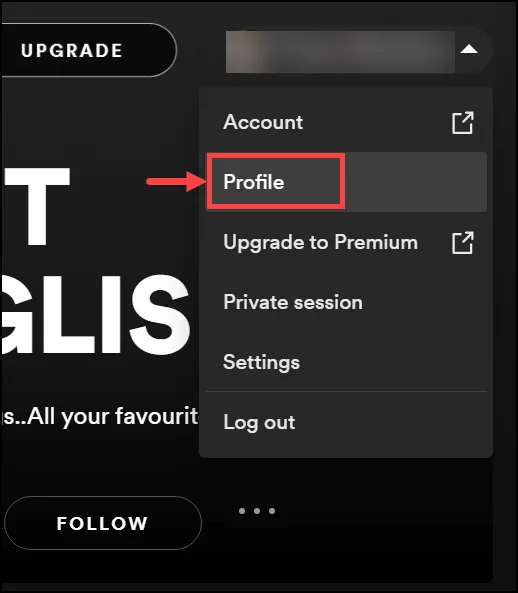
- Click on your name and select Profile from the list.
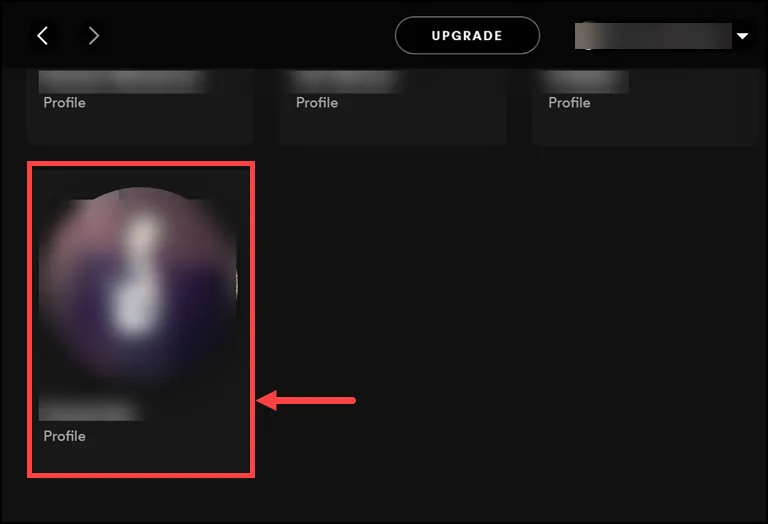
- Scroll down and under Following, choose the friend whose playlist you want to access.
- You will reach your friend’s profile and can access their Public Playlists.

- You can also follow your friend’s playlist if you like it.
Access and add the Friend’s Playlists on Spotify Android/iPhone
- Open the Spotify app on your Android or iPhone device.
- Tap on the Gear icon at the top-right to open Settings.
- Next, tap on the View Profile option.
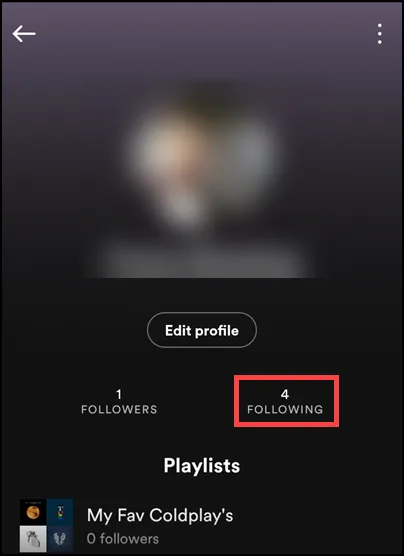
- Push the Following button to see whom you are following.
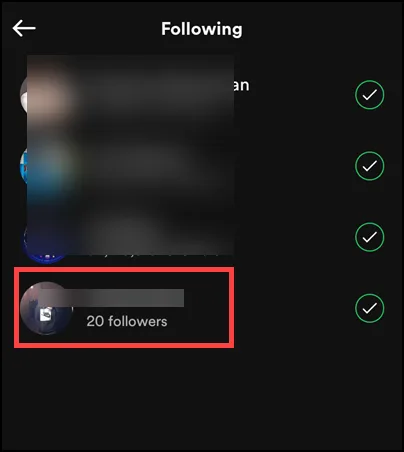
- Tap on the profile whose playlist you want to access.
- The profile will be opened. Scroll down and access the public playlists.

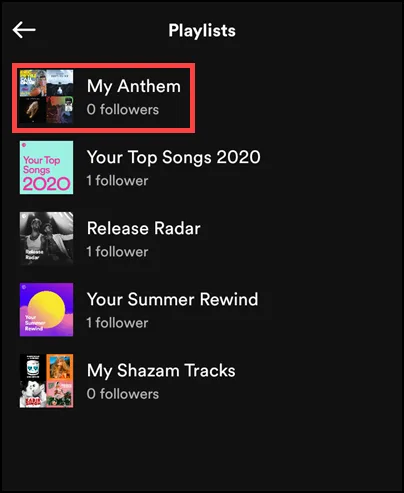
- To add the playlist to your profile, tap on it.
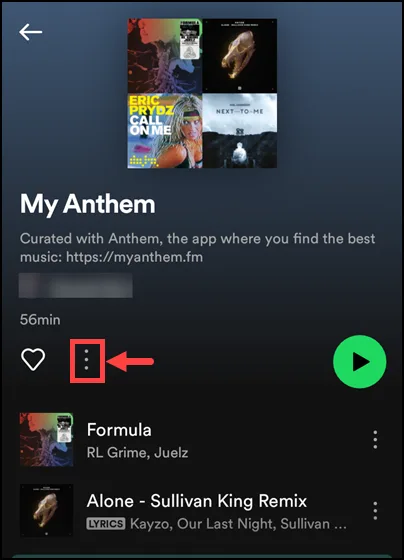
- Next, push the three-dot iconc to expand menu.
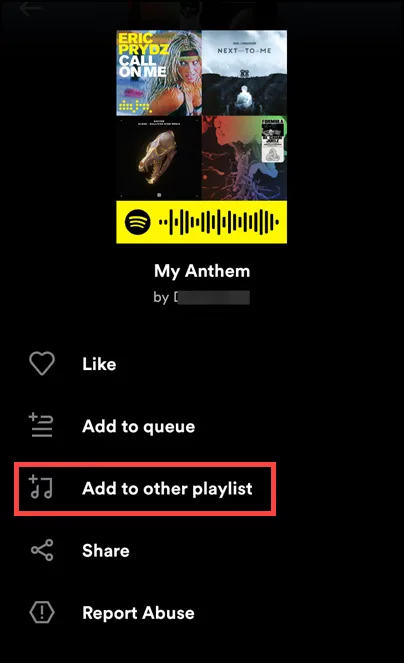
- On the next page, select Add to other playlist.
Expert Tips for Finding Profiles
When searching for users, keep in mind that Spotify’s search algorithm prioritizes verified artists and popular public profiles. If you are searching for a friend by their display name and cannot find them, it is often because their profile is set to private or they haven’t published any public playlists. For the most accurate results, we recommend using the direct Profile Link, which can be found by your friend clicking ‘Share’ > ‘Copy Link to Profile’ within their own account settings.
A common hurdle we see users face is the ‘Facebook Sync’ lag. If you’ve recently connected your Facebook account but your friends aren’t appearing, try toggling the ‘Show my followers on my public profile’ setting off and on again. From our testing, this often forces a cache refresh and populates your friend list immediately. Also, ensure your ‘Social’ settings allow your activity to be public if you want your friends to find you.
As privacy experts, we recommend being mindful of what you share. While following people allows you to see their ‘Listening Activity’ (on Desktop), you can enter a ‘Private Session’ at any time if you don’t want your followers to see your current tracks. Spotify also allows you to ‘Block’ users from viewing your profile, a vital feature if you want to keep your curated playlists away from specific individuals.
Frequently Asked Questions

What to Do if the ‘Find Friends’ Option Is Not Working in Spotify?
Why Can’t I See My Facebook Friends on Spotify?
Why Isn’t It Easier to Add Friends on Spotify?
How to Find Someone on Spotify Without Facebook?
Summing Up
Adding friends on Spotify is an easy way to get music recommendations and to expand your playlists. You can either add them by using their Facebook account or searching for their username on the Spotify app. After adding, you can access your friend’s playlists and also add songs from their playlist to your profile.
Now that you know how to add friends on Spotify, it will be much easier to enjoy music with others. You can now start streaming your favorite songs and podcasts with friends!

Leave a comment
Have something to say about this article? Add your comment and start the discussion.